Features
Notification peeks
Messages, Mail, Slack and more slide out of the closed notch as they arrive.
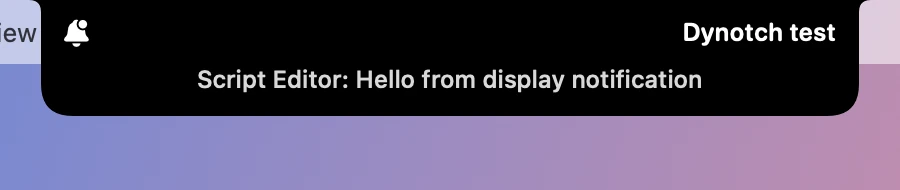
When a notification arrives, it slides out of the closed notch: the app’s symbol, who it’s from, and a line of text.

Messages, Mail, Slack, Microsoft Teams, Outlook, WhatsApp, Telegram, Signal, Discord, FaceTime, Zoom, Calendar and Reminders have symbols of their own. Other apps get a bell, and the line starts with the app’s name.

Turning it on
macOS has no public API for other apps’ notifications, so Dynotch reads them from Notification Center’s own database, which only apps with Full Disk Access can open.
- Open System Settings›Privacy & Security›Full Disk Access.
- Turn on Dynotch. Add it with + if it isn’t listed.
- macOS may ask you to quit and reopen Dynotch.
Choosing what peeks
Settings›Live Activities›Notifications chooses which apps peek. Other apps covers everything without a symbol of its own.
Peeks stay hidden while any Focus is on, even for apps that Focus lets through, and while a display is mirrored. Dynotch can’t tell when the screen is shared, so Hide message text, which shows only the app and the sender, is worth turning on if you share it.
Showing only the peek
Dynotch only reads notifications, so macOS keeps showing its own banner for each one. To see only the peek for an app:
- Open System Settings›Notifications and choose the app.
- Set its alert style to None.
- Leave Show in Notification Center on, because that’s where Dynotch reads them from.
Why it’s a few seconds behind
macOS saves a notification to that database about five seconds after it arrives, and holds off longer while the same app keeps sending, so a peek comes that much after the system banner. Dynotch picks it up about 50 ms after macOS saves it.
Trying it
This posts a notification as Script Editor, which peeks with a bell while Other apps is on:
osascript -e 'display notification "Hello" with title "Test"'Privacy
The database is opened read-only. Dynotch shows a notification and forgets it: nothing a notification says is logged or saved. All it keeps, and only while it runs, is the time of the newest notification it has seen and the row numbers of the last few, so it doesn’t show one twice.